Docker¶
The EnforceGate vX standalone bundle is the primary Docker deliverable: a signed tarball containing the engine, the captive portal, the TLS terminator, the operator CLI (eghost), and a self-contained guided installer that drives end-to-end setup.
Consider the appliance first
The container payload here is identical to the virtual appliance, but the appliance ships on a host OS that Exosys delivers, hardens, and patches; on the Docker path the host OS is yours to harden and maintain. For most environments — especially production deployments without a mature Linux-hardening baseline — the appliance is the recommended and supported path. Use the Docker bundle when you have an established CIS / STIG (or equivalent) baseline on the host and the operational discipline to keep it patched.
Authoritative procedure
The installer and its bundled documentation are the canonical source of truth for installation on Docker hosts. The VERIFY.md file shipped alongside the tarball and the README.md inside the unpacked enforcegate-installer/ directory contain the exact, version-matched step-by-step procedure (commands, expected output, troubleshooting). This page is a high-level summary.
Prerequisites¶
- Docker Engine 20.10+ with Docker Compose v2.
- Your user added to the
dockergroup (id | grep dockerto verify). - A real terminal session — the installer runs as a full-screen terminal UI and needs a real TTY. SSH works (use
ssh -tfor non-interactive sessions); piping ornohupdoes not. - ~750 MB of disk for the unpacked installer, loaded images, and the first-boot cert DB.
- 2 vCPU, 1 GiB RAM minimum (overridable in the installer's network step).
The installer works on any modern Linux distribution that ships Docker 20.10+ (Alpine, Debian, Ubuntu, RHEL family all tested).
Download¶
Download these six files from the Software Downloads Portal into the same directory:
enforcegate-standalone-<edition>-<version>-<TIER>.tar.zst— the signed installer tarball.<edition>ispro,businessorenterpriseand must match your licence;<TIER>is the release class (e.g.GD-prod). Example:enforcegate-standalone-pro-2026.52.0-GD-prod.tar.zst. See release artifact names.enforcegate-standalone-<edition>-<version>-<TIER>.tar.zst.sig— the cosign signature bundleexosys-release.pub— the public key that produced the signatureSHA256SUMS,SHA512SUMS— checksum manifests for integrityVERIFY.md— the verification runbook
Verify¶
Two integrity checks. First the plain checksum manifests:
Set these to match the files you downloaded — the commands below reuse them. See the changelog for the current release version.
export EDITION=pro          # pro | business | enterprise — must match your licence
export VERSION=2026.52.0    # set to the version you downloaded — see the changelog for the current release
export TIER=GD-prod         # full tier, e.g. GD-prod | EA-prod | IR-test
Every line should print OK. Then the cosign signature against the Exosys release public key:
cosign verify-blob --insecure-ignore-tlog \
    --key exosys-release.pub \
    --bundle enforcegate-standalone-${EDITION}-${VERSION}-${TIER}.tar.zst.sig \
    enforcegate-standalone-${EDITION}-${VERSION}-${TIER}.tar.zst
Verified OK is the expected output. Anything else means the tarball was tampered with in transit — do not proceed.
Need cosign itself? See installing cosign — version 2.5.x is sufficient for verification, and no smart-card build tags are required (those are only for the signing side).
Cross-check the public key fingerprint against the value published at https://docs.exosys.ch/keys/exosys-release.pub.sha256:
Unpack¶
Install¶
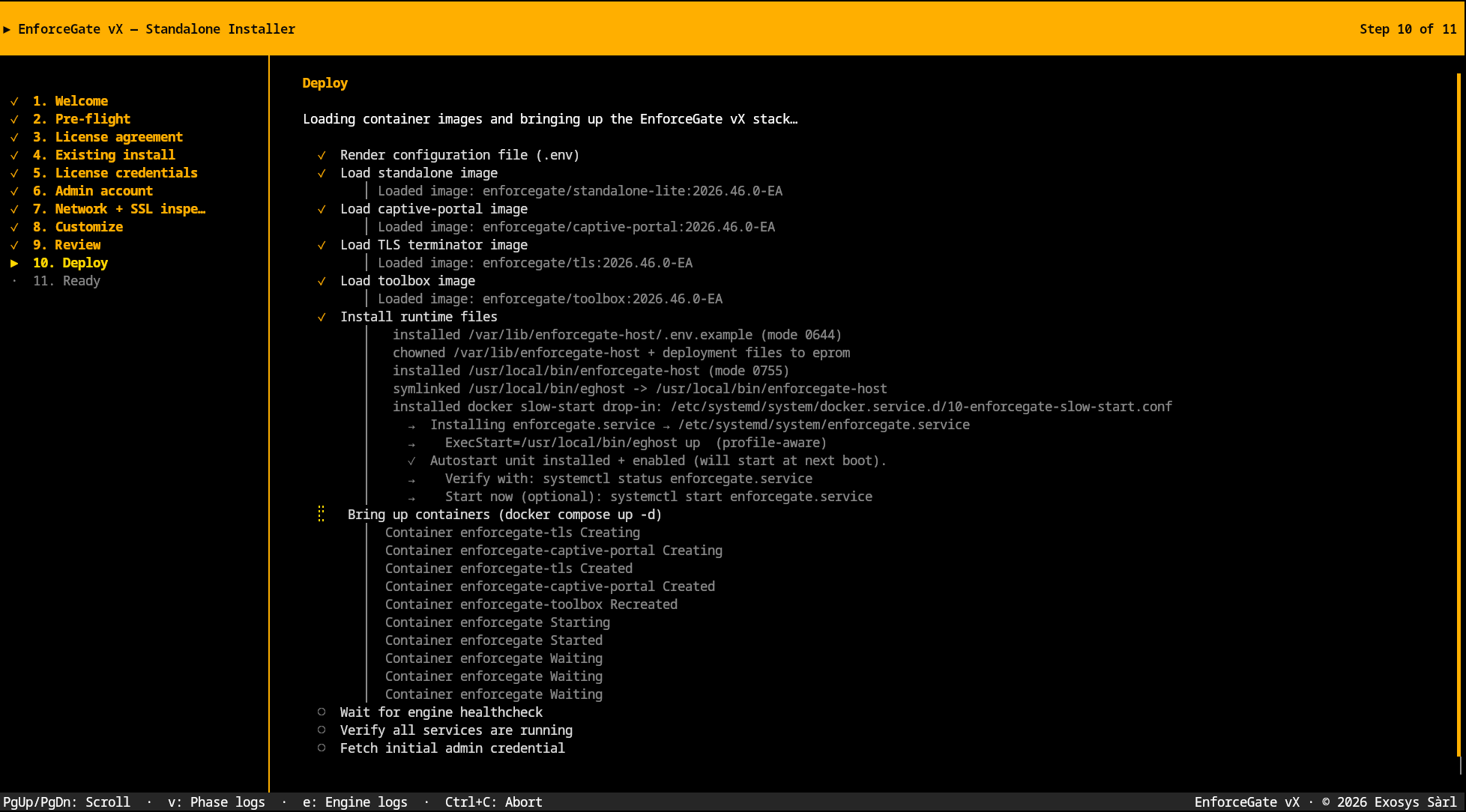
Run the installer. It is a full-screen terminal UI — read each panel and the bottom-bar key bindings before pressing Enter.
The wizard walks you through eleven steps:
- Welcome — brief intro to the flow.
- Pre-flight checks — confirms Docker is reachable, Compose v2 is available, and the bundle's files are present.
- License agreement — pages the EULA, the Software License, and the Warranty. Confirm acceptance by typing the literal string
I ACCEPT. Acceptance is logged with a tamper-evident hash chain. - Existing install — detects whether a previous deployment is present on the host and, if so, switches the wizard to the upgrade path so all named volumes and operator state are preserved.
- License credentials — the serial, username, and password issued with your subscription. Forwarded to the engine, which authenticates with the Exosys Control Server on first boot to mint your license. See Editions.
- Admin account — the operator credential (username + password) used for the engine Control API superadmin. Default username
enforcegate; replaces the build-time default (enforcegate-changemepassword). - Network + SSL inspection — the public hostname clients reach the captive portal at, plus CPU/RAM limit overrides and the SSL inspection mode (
off(default),peek, orbump).bumptriggers an additional legal acknowledgement step per EULA § 3. - Customize — opt-in components beyond the default enforcement stack. The main opt-in today is the toolbox sidecar for scheduled category-list refresh and operator scripting.
- Review — final summary of your inputs before the deploy phase runs.
-
Deploy — loads the signed image tarballs into Docker, brings the compose stack up (engine, captive portal, TLS terminator, and — if enabled — the toolbox sidecar), installs runtime files under
/var/lib/enforcegate-host/, drops theeghostoperator CLI at/usr/local/bin/eghost, enables theenforcegate.servicesystemd unit for autostart, and waits for the engine's healthcheck to flip green (up to 120 s). The wizard streams every action as it happens (screenshot at the top of this section) —vopens the phase logs andeopens the engine logs for real-time inspection during the boot.Ctrl+Caborts cleanly with no partial state written. -
Ready — final panel with the captive portal URL, the proxy host:port, the license state (
Licensed/Grace/Floor), and the operator commands you'll most often need.
The installer drops the eghost operator CLI at /usr/local/bin/eghost so day-2 operations work out of the box.
Day-2 operations¶
After installation, every common operator action runs through eghost:
eghost                          # one-screen deployment dashboard
eghost status                   # detailed engine + sidecar health
eghost version                  # CLI + per-image versions
eghost logs                     # follow compose logs
eghost restart                  # restart the stack
eghost policy list              # list policy files
eghost policy edit <name>       # edit a policy in $EDITOR (auto-reloads)
eghost cli                      # drop into the engine CLI (egctl) REPL
eghost support bundle           # write a redacted diagnostic tarball
See the eghost reference for the full verb list.
Re-running the installer¶
The installer is safe to re-run on a host where EnforceGate vX is already running. Use this path to:
- Rotate license credentials after a renewal.
- Change the SSL inspection mode.
- Move the deployment to a new public hostname.
EULA acceptance short-circuits when the audit log already records an acceptance of the current agreement.
Uninstall¶
cd enforcegate-installer/bundle
docker compose down -v   # -v wipes the named volumes (license, config, certs)
cd ../..
rm -rf enforcegate-installer
Omit -v to preserve the EULA-acceptance audit log and the persisted license — re-running the installer afterwards picks up where you left off.
Upgrading¶
When a new release ships, the upgrade procedure is the same as the appliance — download the new bundle, verify it, and re-run sudo ./install.sh. See upgrade for the full flow.