Captive portal¶
The captive portal is the in-product landing page rendered to a visitor whenever the engine emits a verdict redirect — block, warn, or aup. It also hosts a self-service install page for the SSL-bump CA so unmanaged devices can join the proxy without an MDM / GPO trust-store push.
The portal is not a guest-Wi-Fi email-capture form. Visitors land here because the security gateway intercepted their request. There is deliberately no marketing-consent checkbox — the only data collected is what the gateway needs to authorise, log and audit the request.
The portal is a Python application. It runs as a separate enforcegate-captive-portal service in the bundled docker-compose.yml, fronted by a the TLS terminator tls-terminator service that publishes :80 (redirect to HTTPS) and :443 (TLS) on the host.
Explicit-proxy deployments need a client-side setup step
When EnforceGate vX runs as an explicit proxy, client machines must be configured to bypass the proxy for the portal host — otherwise the browser tries to CONNECT-tunnel the portal redirect through the proxy and aborts with SSL_ERROR_RX_RECORD_TOO_LONG. See Client setup for the captive portal for the PAC / WPAD / GPO / MDM delivery paths and the companion bump-CA trust step.
Deployment shape¶
   browser ───► tls-terminator  ───► captive-portal  ───► engine (Control API)
                  :80 redirect → :443        :8000 (compose          :11225 (compose
                  :443 TLS (bump-CA            network only)           network only)
                  signed leaf cert)
- The browser never speaks directly to the engine; the portal proxies
/api/captive/ackserver-side to the engine's:11225Control API listener. - The TLS terminator is bare with one upstream —
captive-portal:8000. It does not know any of the portal's URL space. - The leaf TLS certificate the terminator serves is the engine-issued portal cert, signed by the SSL-bump CA. Operators distribute one CA (the bump CA) to client trust stores and every TLS hop in the deployment chains to it.
Routes¶
The portal exposes a small, fixed set of routes. The path is the verdict — a given verdict always lands on one URL, with no path-level dispatch from query parameters.
Verdict pages¶
Rendered in English, French, German and Italian (the four Swiss locales). The visitor's preferred language is selected from Accept-Language with a manual override available in the topbar.
| Route | Verdict | Behaviour |
|---|---|---|
/blocked |
block |
Terminal page. Explains the rule that matched and the description text from the policy. No CTA. |
/warned |
warn |
Two flavours, chosen by the engine. With an ack_token in the inner payload — renders a "Proceed anyway" CTA pointing at /api/captive/ack. Without — renders a terminal alert with no CTA. The engine controls which flavour by including or omitting the token. |
/aup |
aup |
Same two-flavour pattern as /warned. CTA text is "I acknowledge and continue" instead of "Proceed anyway"; the portal records the acceptance against the configured PRIVACY_POLICY_VERSION so the operator can prove which notice the visitor accepted. |
The /blocked page rendered against a deny verdict, showing the destination, the rule's description, and the matched rule name:
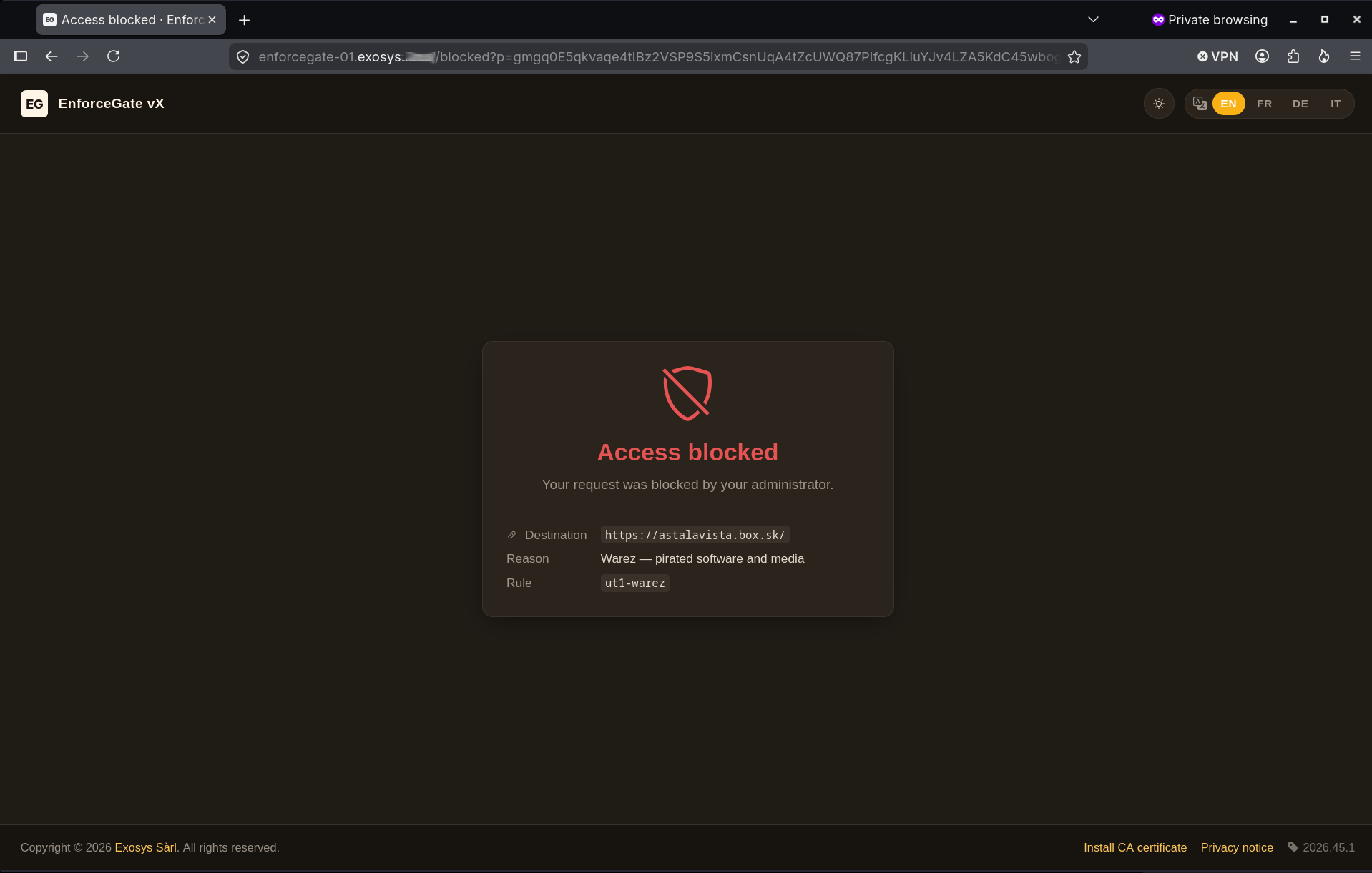
Every field visible on the page is engine-provided — the destination is the URL the visitor requested, the reason text is the description: from the matched .policy rule (Warez — pirated software and media in this shot), and the rule identifier (ut1-warez) is the rule name straight out of show policy list so operators can grep the audit log back to the specific policy. /warned and /aup share the same layout and add a CTA button below the detail card.
Internal ack endpoint¶
| Route | Purpose |
|---|---|
/api/captive/ack |
Server-side proxy to the engine's control-API ack endpoint. Forwards the visitor's ?p=…&v=1&ts=… verbatim and passes the engine's HTTP 302 back to the browser unchanged. Hop-by-hop headers stripped. Returns 404 when the engine URL is empty (single-image deployment without a portal sidecar). |
Self-service CA install¶
When SSL-bump inspection is active and the bump CA has been published into the shared volume, two additional routes appear:
| Route | Purpose |
|---|---|
/ca |
Self-service install page with per-OS step-by-step instructions for iOS, Android, macOS, Windows, Linux/Debian and Linux/RHEL — plus prominent SHA-256 and SHA-1 fingerprints for out-of-band verification. |
/ca.crt |
Direct PEM download of the bump CA, served at the same origin as the install page. |
Both routes 404 when bump mode is not active or the CA path is unreadable, so the feature stays invisible in non-intercepting deployments. Plain-HTTP exposure of /ca and /ca.crt is whitelisted in the bundle's TLS-terminator config (so unmanaged devices can fetch the CA before they have it installed); every other path on :80 redirects to HTTPS.
The page is the unmanaged-device fallback for the CA-distribution problem: managed devices receive the CA via GPO / Intune / Jamf, but BYOD laptops, guest devices and personal phones need a self-service path.
Health and version¶
| Route | Purpose |
|---|---|
/healthz |
JSON liveness probe — {"status":"ok","version":"2026.x.y","release_type":"IR"}. Unauthenticated. Compose healthchecks may target this route. |
X-Portal-Version |
Response header on every page. Carries the portal version (with release-type suffix when set). |
<meta name="portal-version"> |
In every <head>. Lets support engineers read the version off any screenshot. |
Redirect security¶
Every URL the engine sends the browser to a verdict page with carries exactly three URL parameters:
p— an encrypted payload.v— protocol version (currently"1").ts— Unix epoch seconds, for replay protection.
The encryption key is shared between the engine and the portal via [captive_portal].secret. Operator-visible properties:
- Visitors cannot read verdict context from the URL bar. The destination URL, matched rule name, reason, category and any other verdict-bound field travel inside the encrypted payload. Nothing decodable to the visitor leaks into history or the
Refererheader. - The portal verifies and decrypts. A tampered
pfails the integrity check and the portal returns403. - Replay window is bounded. Requests where
tsis more thanENGINE_SIGNATURE_MAX_AGE_SECONDS(default 300 s) old are rejected. - Connectors never see the secret. They are pure relays — they receive the pre-built URL from the engine and hand it to the browser as an
HTTP 302.
The wire-level cryptographic construction is documented in the public protocol spec for portal integrators (not on this site).
Proceed-anyway round-trip¶
For verdicts with a CTA (warn and aup with ack_token present):
Browser            tls-terminator (:443)        Captive portal       Engine (:11225)
   │                    │                    │                     │
   │ GET /warned?p=…&v=1&ts=…                │                     │
   ├───────────────────►│ reverse-proxy ────►│ decrypt p     │
   │                    │                    │ → render warned    │
   │                    │                    │   page             │
   │◄───────────────────│◄───────────────────│                    │
   │                                                                │
   │ ▼ user clicks "Proceed anyway"                                 │
   │                                                                │
   │ GET /api/captive/ack?p=…&v=1&ts=…                              │
   ├───────────────────►│ reverse-proxy ────►│ server-side GET to │
   │                    │                    │ engine             │
   │                    │                    ├────────────────────►│ verify ack
   │                    │                    │                     │ record session
   │                    │                    │                     │ return 302 →
   │                    │                    │                     │   original URL
   │                    │                    │◄────────────────────│
   │                    │◄───────────────────│                     │
   │ 302 → origin URL   │                    │                     │
   │◄───────────────────│                    │                     │
Why this shape:
- Single upstream from the terminator's perspective. Path-aware reverse-proxying lives in the portal, not in the terminator. Operators who need to swap the TLS terminator out only need to point at
captive-portal:8000. - The browser never sees
:11225. The shippeddocker-compose.ymldoes not publish the engine's Control API to the host. The portal is the only path in.
Operator identity¶
Two distinct entities show up in the UI:
- Software publisher — the author of the captive portal code, templates and design. Always Exosys Sàrl. Rendered as the footer copyright (
Copyright © <year> Exosys Sàrl. All rights reserved.). Not environment-overridable. - Operator — the entity running this specific instance (the customer fronting EnforceGate with their hostname and TLS certificate). Surfaces in the privacy notice § 5 ("contacting …, the operator of this gateway") and as the display name on the CA install page.
The operator name is resolved at render time from three sources, in order:
ENFORCEGATE_ORG_NAME— supplied by the installer (the same value baked into the bump CA's Subject DNO=). Rendered as plain text on both surfaces, because the installer doesn't carry a companion URL.BRAND_COMPANY— paired withBRAND_COMPANY_URL, so it renders as a linked anchor.- Literal fallback —
"your network administrator"in the privacy notice;"EnforceGate"on the CA install page.
In short: customers customise the operator identity; the software copyright stays attributed to Exosys.
Operator AUP page¶
From 2026.36.0 onwards, the captive portal can render an operator-supplied Acceptable Use Policy on the /aup verdict page. When a request matches a rule with action: aup, the visitor lands on a page that shows your operator-authored policy text (Markdown), followed by an "I acknowledge and continue" CTA that records the acceptance against the configured PRIVACY_POLICY_VERSION. The default /aup content (a generic placeholder) is replaced by your text — every other route is unaffected.
Manage the operator AUP exclusively through the eghost portal aup verb family on the host:
eghost portal aup edit          # open the Markdown in $EDITOR (seeds a template on first edit)
eghost portal aup enable        # turn the rendering on without editing
eghost portal aup disable       # fall back to the built-in default /aup content
eghost portal aup show          # print the current Markdown to stdout
eghost portal aup status        # report enabled state, mtime, and portal health
The feature is off by default. eghost portal aup edit enables it on save and recreates the captive-portal container so the new policy is served on the next /aup verdict; the verb verifies the portal stays up after the recreate and auto-reverts the change if the container crashed.
Markdown subset
The portal renders the file through its built-in Markdown processor. Headings, lists, links, emphasis, code spans, and block quotes work as expected. The processor does not execute embedded HTML / JavaScript — the file is sanitised before render, so operators cannot accidentally introduce active content (or be tricked into pasting some).
Theming¶
The portal has two independent axes that combine freely:
| Axis | Decided by | Mechanism |
|---|---|---|
| Palette (brand hue) | Operator | BRAND_PALETTE environment variable |
| Light / dark theme | End user | Topbar toggle, persisted in browser localStorage (falls back to OS prefers-color-scheme) |
A single palette ships in light and dark flavours; the visitor can flip between light and dark regardless of which palette the operator configured.
| Palette | Notes |
|---|---|
indigo |
Default. Cool indigo primary, neutral grey surfaces. |
amber |
Warm amber primary, cream / dark-brown surfaces. |
bsod |
Homage / parody palette inspired by the flat stop-screen aesthetic. Theme toggle flips between flat blue (light) and black (dark). Verdict pages render with a large :( accent. |
Unknown palette values fall back silently to indigo.
Configuration¶
The portal is configured exclusively via environment variables forwarded from the bundle's .env. The operator-relevant subset:
| Variable | Purpose | Default |
|---|---|---|
ENFORCEGATE_CAPTIVE_SECRET_KEY |
Random 32+ char string for portal session-cookie signing. Required in production. | (no default) |
ENFORCEGATE_CAPTIVE_HOSTNAME |
FQDN clients reach the portal at. Drives the portal TLS leaf certificate CN/SAN. | localhost (smoke-test only) |
ENFORCEGATE_CAPTIVE_BASE_URL |
Public URL the engine puts in signed redirect tokens. Must match what the TLS terminator publishes. Used for the portal's own absolute-URL generation. | (uses image default) |
ENFORCEGATE_CAPTIVE_HTTP_PORT |
Host port for the TLS terminator's HTTP-redirect listener. | 80 |
ENFORCEGATE_CAPTIVE_HTTPS_PORT |
Host port for the TLS terminator's HTTPS listener. | 443 |
ENFORCEGATE_ORG_NAME |
Operator (customer) organisation name. See Operator identity. | (unset) |
ENFORCEGATE_CAPTIVE_BRAND_COMPANY |
Fallback operator name when ENFORCEGATE_ORG_NAME is unset. |
Exosys Sàrl |
ENFORCEGATE_CAPTIVE_BRAND_PRODUCT |
Product name shown in the topbar and titles. | EnforceGate vX |
ENFORCEGATE_CAPTIVE_BRAND_PALETTE |
indigo, amber, or bsod. See Theming. |
indigo |
ENFORCEGATE_CAPTIVE_LOCALE |
Default locale. | en |
ENFORCEGATE_CAPTIVE_SUPPORTED_LOCALES |
Comma-separated locales the portal will render. | en,fr,de,it |
ENFORCEGATE_CAPTIVE_DATABASE_URL |
SQLAlchemy URL. See Storage. | image-defined |
ENGINE_INTERNAL_URL |
Engine Control API URL the portal forwards /api/captive/ack to server-side. Empty string disables the route. |
https://enforcegate:11225 |
ENGINE_SIGNATURE_MAX_AGE_SECONDS |
Replay window for the ts parameter on signed redirects. |
300 (5 minutes) |
PRIVACY_POLICY_VERSION |
Version identifier recorded against each AUP acceptance so operators can prove which notice the visitor accepted. | (a date-coded default) |
Storage¶
The portal uses SQLAlchemy and refuses to boot without DATABASE_URL set. The captive portal upstream targets PostgreSQL as its production backing store (recommended for any deployment that needs to persist AUP acceptance records or future authentication state). The shipped IR bundle's docker-compose.yml defaults to an ephemeral SQLite file on container tmpfs — which wipes on every restart — so the standalone deployment boots out of the box with no external database to manage.
To switch to persistent storage, set ENFORCEGATE_CAPTIVE_DATABASE_URL in .env. SQLite on a named volume:
ENFORCEGATE_CAPTIVE_DATABASE_URL=sqlite:////app/data/captive-portal.db
Or PostgreSQL (recommended for production):
ENFORCEGATE_CAPTIVE_DATABASE_URL=postgresql+pg8000://portal:portal@captive-portal-db:5432/captive_portal
…and add a captive-portal-db service to the compose stack. See persistence for the broader volume model.